
Description
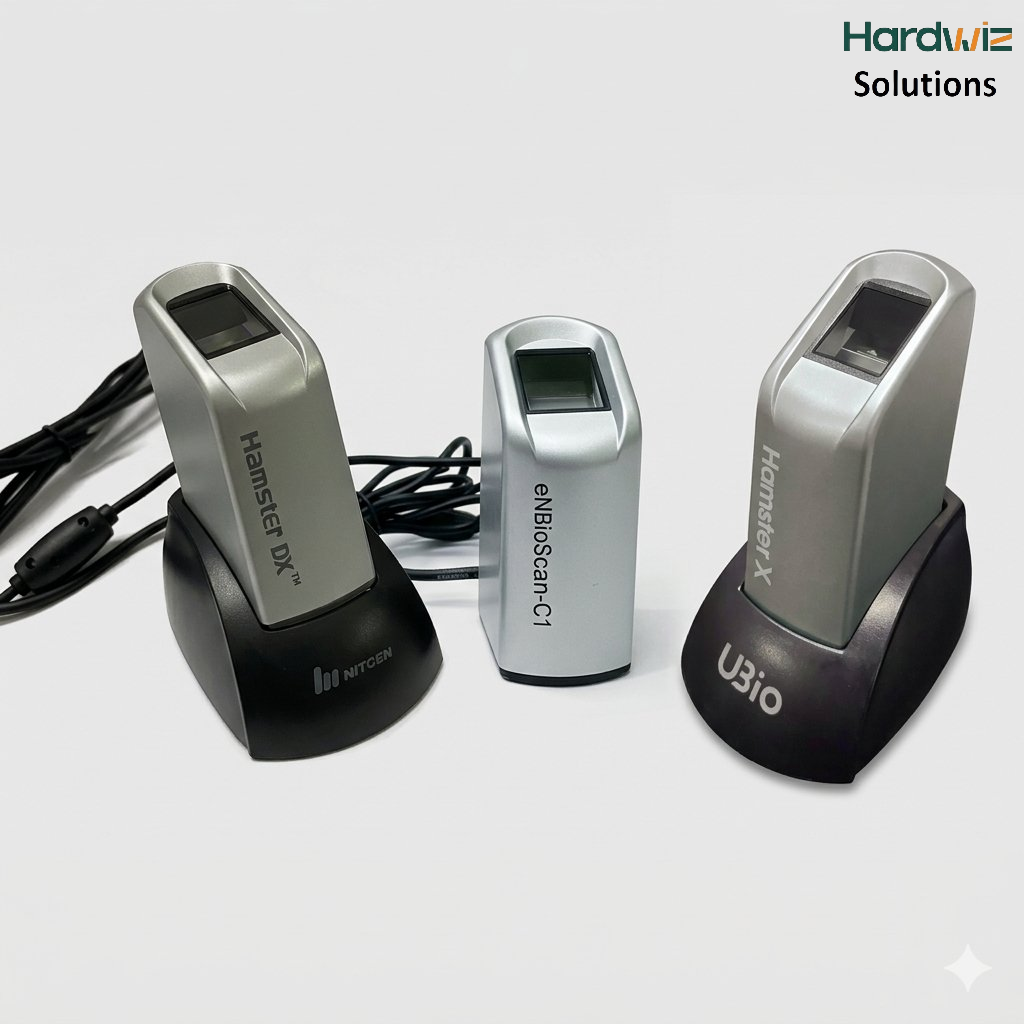
The NITGEN Hamster X HFDU08, HFDU06 and HFDU06R are USB fingerprint scanners designed for fingerprint capture, biometric verification and identification applications.
These NITGEN fingerprint scanners are suitable for non-Aadhaar biometric applications, including land and property registration, government and enterprise applications, attendance systems, access control, secure workstation login and custom fingerprint authentication software.
Hardwiz Solutions supplies NITGEN biometric fingerprint scanners and provides driver resources and technical assistance for supported applications.
Important: NITGEN HFDU08, HFDU06 and HFDU06R discussed on this page are non-Aadhaar biometric fingerprint scanners. They should not be confused with Aadhaar-specific L1 biometric devices or Aadhaar RD-service products.
What Is the NITGEN Hamster X Fingerprint Scanner?
The NITGEN Hamster X (UBio) is a fingerprint biometric scanner designed to capture fingerprints and provide biometric data to compatible software applications.
NITGEN’s biometric SDK ecosystem provides functionality for fingerprint capture, enrollment, verification and identification. Its SDKs have been offered for Windows, Linux and Android development environments.
The devices are therefore useful for organizations and developers that require a fingerprint scanner for their own biometric application or an existing application that supports NITGEN hardware.
NITGEN HFDU08 Fingerprint Scanner
The NITGEN HFDU08 is a single-fingerprint USB scanner using an optical fingerprint sensor. Technical documentation describes the HFDU08 as a USB fingerprint scanner with a high-resolution optical sensor and support for Windows and Linux.
The HFDU08 can be used for applications where a reliable fingerprint capture device is required.
HFDU08 Applications
Typical applications can include:
- Land registration
- Property registration
- Government applications
- Employee identification
- Attendance systems
- Access control
- Secure PC login
- Enterprise authentication
- Client-server biometric applications
- Web-based fingerprint applications
- Custom biometric software
- Fingerprint enrollment and verification
- Punjab Patwarkhana land registration
- MP e-Krishi Yantra Anudan Portal
A government biometric installation manual also documents the NITGEN HFDU08 as a biometric device and provides installation instructions for its driver.
NITGEN HFDU06 Fingerprint Scanner
The NITGEN HFDU06, also associated with the Fingkey Hamster DX family, is a USB fingerprint scanner designed for fingerprint capture and authentication applications.
NITGEN download resources list the Fingkey Hamster DX HFDU06 with Windows drivers and SDK resources.
The HFDU06 can be integrated into applications requiring fingerprint enrollment and verification.
HFDU06 Applications
Depending on software support, applications may include:
- Land registration
- Property documentation
- Government department applications
- Attendance management
- Access control
- Enterprise authentication
- Secure computer login
- Fingerprint verification
- Fingerprint identification
- Client-server applications
- Custom biometric applications
NITGEN HFDU06R Fingerprint Scanner
The NITGEN HFDU06R belongs to the NITGEN fingerprint scanner family and can be used for compatible fingerprint capture and authentication applications.
When purchasing or installing an HFDU06R, it is important to verify the exact model number because NITGEN has produced multiple fingerprint scanner models and variants.
The correct driver and software should be selected according to the actual device model and the application being used.
NITGEN HFDU08 / HFDU06 / HFDU06R Are Not Aadhaar Biometric Devices
This is an important distinction for customers searching online for NITGEN fingerprint scanners.
NITGEN HFDU08, HFDU06 and HFDU06R should not be presented as Aadhaar-based biometric devices.
These scanners are intended for applications that use their fingerprint capture and authentication capabilities through compatible drivers, SDKs and application software.
They can therefore be particularly useful where an organization needs to maintain its own fingerprint database and perform biometric enrollment, verification or identification.
NITGEN’s SDK documentation specifically describes functionality for fingerprint capture, storage and matching, including 1:1 and 1:N matching.
Difference Between Aadhaar and Non-Aadhaar Fingerprint Scanners
| Feature | NITGEN HFDU08/HFDU06/HFDU06R |
|---|---|
| Fingerprint Capture | Yes |
| USB Connectivity | Yes |
| Standalone Biometric Applications | Yes |
| Custom Fingerprint Software | Yes |
| Fingerprint Enrollment | Supported through compatible software/SDK |
| 1:1 Verification | Supported through compatible software/SDK |
| 1:N Identification | Supported through compatible software/SDK |
| Aadhaar Authentication Device | No |
| Aadhaar RD Service Product | No |
| Custom Database Applications | Yes |
| Land Registration Applications | Suitable where application supports device |
| Attendance Applications | Suitable where application supports device |
| Access Control | Suitable where application supports device |
NITGEN Fingerprint Scanner for Land Registration
One important application for NITGEN fingerprint scanners in India is land and property registration.
Government biometric implementations have used NITGEN devices such as the HFDU08 for biometric device installation and fingerprint capture.
For a land-registration application, the fingerprint scanner communicates with the application through its driver and/or biometric software.
The exact compatibility depends on the software deployed by the relevant department or organization.
NITGEN Fingerprint Scanner for Delhi Jal Board and Government Applications
NITGEN biometric scanners can also be used in specialized government and enterprise applications where fingerprint authentication is required.
Hardwiz Solutions supplies NITGEN fingerprint scanners for non-Aadhaar biometric applications, including specialized government and departmental projects.
For such projects, the most important factor is application compatibility rather than Aadhaar RD-service compatibility.
NITGEN HFDU08 / HFDU06 Applications
1. Land Registration
Fingerprint authentication can be integrated into land and property registration systems where the government application supports the NITGEN scanner.
2. Attendance Management
Organizations can use fingerprint scanners for employee attendance and workforce management applications.
3. Access Control
Fingerprint authentication can provide an additional layer of identity verification for controlled access systems.
4. Secure Computer Login
NITGEN fingerprint devices can be integrated with applications that replace or supplement traditional password-based authentication.
5. Government Applications
Departments can integrate biometric fingerprint capture into specialized government applications.
6. Enterprise Applications
Companies can use fingerprint authentication for employee verification, application login and other internal security systems.
7. Custom Biometric Software
Developers can use supported NITGEN SDKs to build applications for fingerprint enrollment, verification and identification.
NITGEN Hamster X vs Aadhaar Fingerprint Scanner
The two categories should not be mixed.
NITGEN HFDU08 / HFDU06 / HFDU06R are appropriate for compatible non-Aadhaar fingerprint applications, where the software handles fingerprint capture, enrollment, matching or identification.
An Aadhaar biometric device, on the other hand, has specific requirements associated with the Aadhaar authentication ecosystem.
Therefore, if a customer is specifically looking for an Aadhaar L1 fingerprint scanner, the NITGEN HFDU08/HFDU06/HFDU06R should not be recommended as an Aadhaar device.
For a customer looking for land registration, fingerprint database, attendance, access control or custom biometric software, these NITGEN devices can be considered where the target application supports them.
Why Buy NITGEN Fingerprint Scanner from Hardwiz Solutions?
Hardwiz Solutions provides biometric hardware and technical resources for organizations requiring fingerprint authentication solutions.
We can assist with:
- NITGEN HFDU08
- NITGEN HFDU06
- NITGEN HFDU06R
- NITGEN Hamster fingerprint scanners
- Driver installation
- Biometric device testing
- Application compatibility
- Fingerprint scanner setup
- Land registration biometric requirements
- Custom biometric application requirements
Hardwiz Solutions – NITGEN Driver Downloads
Reviews
There are no reviews yet.