Driver
Raivens GPS Device 8.0 Installation Guide
Step 1: Install the Driver
The GPS receiver requires a dedicated utility driver for proper communication with banking software.
Simply connecting the device through Windows Plug-and-Play is not sufficient for CSP operations.
For the latest driver download and installation support, contact Hardwiz Solutions.
Step 2: Configure the Serial COM Port
- Connect the Raivens GPS Receiver 8.0 to an available USB port.
- Open Device Manager on your Windows PC or Laptop.
- Expand the “Ports (COM & LPT)” section.
- Locate:
USB Serial Port
USB Serial CH340
Note the assigned COM Port number such as:
COM3
COM4
COM5
This COM port number must be entered into your SBI, BOB, BOI, BOM, UPGB, MPGB, PNB, or UBI CSP configuration settings.
Step 3: Test GPS Connectivity
After installation:
- Open the Raivens GPS Device Testing Portal.
- Click Connect Device.
- Select your bank from the dropdown list.
- Choose the detected CH340 Serial Port.
- Click Run Device Test.
If configured correctly, the system will display accurate GPS coordinates and validate device connectivity.
Technical Specification
Core Technical Specifications
- Satellite Systems (Multi-GNSS): Supports GPS, NavIC (IRNSS), GLONASS, Galileo, BeiDou, and QZSS.
- Positional Accuracy: Horizontal accuracy of less than 1.8 meters CEP (and under 3 meters standard specs).
- Power & Voltage: Operates on a supply voltage of 3.0V to 5.5V with a low power draw of approximately 95 mA (GPS+Galileo+IRNSS).
- Tracking Sensitivity: High sensitivity rating down to -163 dBm.
- Time-To-First-Fix (TTFF): Cold start achieved in under 13 seconds with AGPS and under 32 seconds without AGPS.
- Interface & Form Factor: USB wired plug-and-play connection with NMEA + Binary position formats.
- Operating Temperature: Functions reliably in extreme conditions from −40 °C to +85 °C with built-in anti-jamming features.
- Special Hardware: Includes an internal backup battery for uninterrupted performance and LED indicators for power and signal status.
Compatibility & Applications
- Banking & Fintech: Configured for state and national banks including SBI, Bank of Baroda (BOB), Bank of India (BOI), Bank of Maharashtra (BOM), PNB, and regional rural banks like MPGB and UPGB.
- Aadhaar/UIDAI: Certified for Aadhaar enrollment software, UCL usage, and bank CSP kiosk location mapping.
- Antenna Options: Available in variants with or without external magnetic/wired antennas (ranging from 3 meters to 13 meters) for improved indoor signal reception.
Faq's
⚙️ Driver & Installation
- Does it require external drivers? Yes, it typically uses standard USB-to-serial drivers (like CH340 or PL2303) which automatically download on Windows 10/11.
- How do I check if it is installed correctly? Open Device Manager, expand Ports (COM & LPT), and look for the assigned COM Port number.
- What if Windows shows an “Unknown Device” error? You must download and install the specific USB-to-Serial driver manually from your bank portal or the official driver page.
🗺️ Software & Portal Compatibility
- Is it certified for Aadhaar software? Yes, it is fully compatible with UIDAI, Aadhaar Enrollment Client, and UCL software.
- Which bank CSP portals support this device? It works seamlessly with SBI, Bank of Baroda, PNB, BOI, BOM, MPGB, and Central Bank CSP kiosks.
- What data output format does it use? It outputs data in the standard NMEA 0183 protocol, which is universally read by location-tagging software.
🛰️ Signal & Hardware
- Why is the GPS LED blinking? A blinking LED means the device has successfully achieved a satellite GPS lock. A solid light means it is searching for a signal.
- Why can’t I get a signal inside my office? GPS signals require a direct line of sight to the sky. Place the device or its magnetic antenna near a window.
- How long does it take to get a signal lock? It takes less than 32 seconds for a cold start and under 2 seconds for a hot start.
- Does it support Indian satellites? Yes, it features native NavIC (IRNSS) support alongside standard GPS and GLONASS.
Description
Raivens USB GPS Receiver 8.0
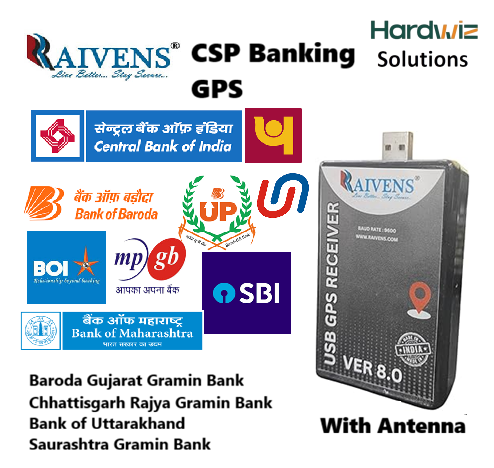
Raivens USB GPS Receiver 8.0 is a reliable GPS geo-tagging device designed for Bank CSP, BC Points, banking kiosks, and other location-based banking applications. It provides accurate GPS coordinates through a USB connection, helping compatible banking software verify the operating location of the CSP or Business Correspondent point.
The Raivens GPS 8.0 is suitable for compatible applications used by SBI, Bank of Baroda (BOB), Bank of India (BOI), Bank of Maharashtra (BOM), UPGB, MPGB, PNB, UBI, and other banking and regional rural bank CSP environments where GPS-based location verification is required.
Key Features
- USB GPS Receiver for CSP and BC Points
- Accurate latitude and longitude location data
- Suitable for compatible banking geo-tagging applications
- USB serial connectivity for Windows computers
- Compatible with supported Windows 10 and Windows 11 systems
- Easy COM port configuration through Windows Device Manager
- Suitable for SBI, BOB and other compatible CSP applications
- Compact design for desktop and laptop use
- Driver and installation assistance available from Hardwiz Solutions
Raivens GPS Device 8.0 for SBI & BOB CSP
The Raivens GPS Device 8.0 can be configured with compatible SBI CSP, BOB BC Point, and other banking applications that require GPS location information. After connecting the device, users can install the required USB serial driver and select the assigned COM port in their banking application.
Easy Installation & Technical Support
Connect the Raivens GPS Receiver 8.0 to your Windows laptop or desktop, install the required driver, and identify the assigned COM port from Device Manager. Once configured, the GPS receiver can be tested with compatible banking software or GPS testing utilities.
Hardwiz Solutions provides product assistance for GPS driver installation, COM port configuration, device testing, and CSP setup. Contact our technical team if you need help configuring the Raivens GPS 8.0 with your compatible banking application.
Why Buy Raivens GPS 8.0 from Hardwiz Solutions?
- Genuine Raivens GPS Receiver 8.0
- Competitive product pricing
- Technical installation assistance
- Driver configuration support
- Remote setup guidance
- Support for CSP and BC point requirements
Order your Raivens USB GPS Receiver 8.0 from Hardwiz Solutions and get technical assistance for installation and configuration.
Contact: +91 9310223033
Reviews
There are no reviews yet.